Reference deployment at CSCS
At the Swiss National Supercomputing Centre (CSCS), JupyterHub is deployed on Kubernetes. From there, JupyterLab servers are launched on different HPC clusters via FirecREST. Each deployment targets a single cluster.
JupyterHub is deployed on ArgoCD using the f7t4jhub Helm chart. The chart is available in the spawner’s repository. It has been designed mainly for CSCS but it’s general enough for the use at other sites.
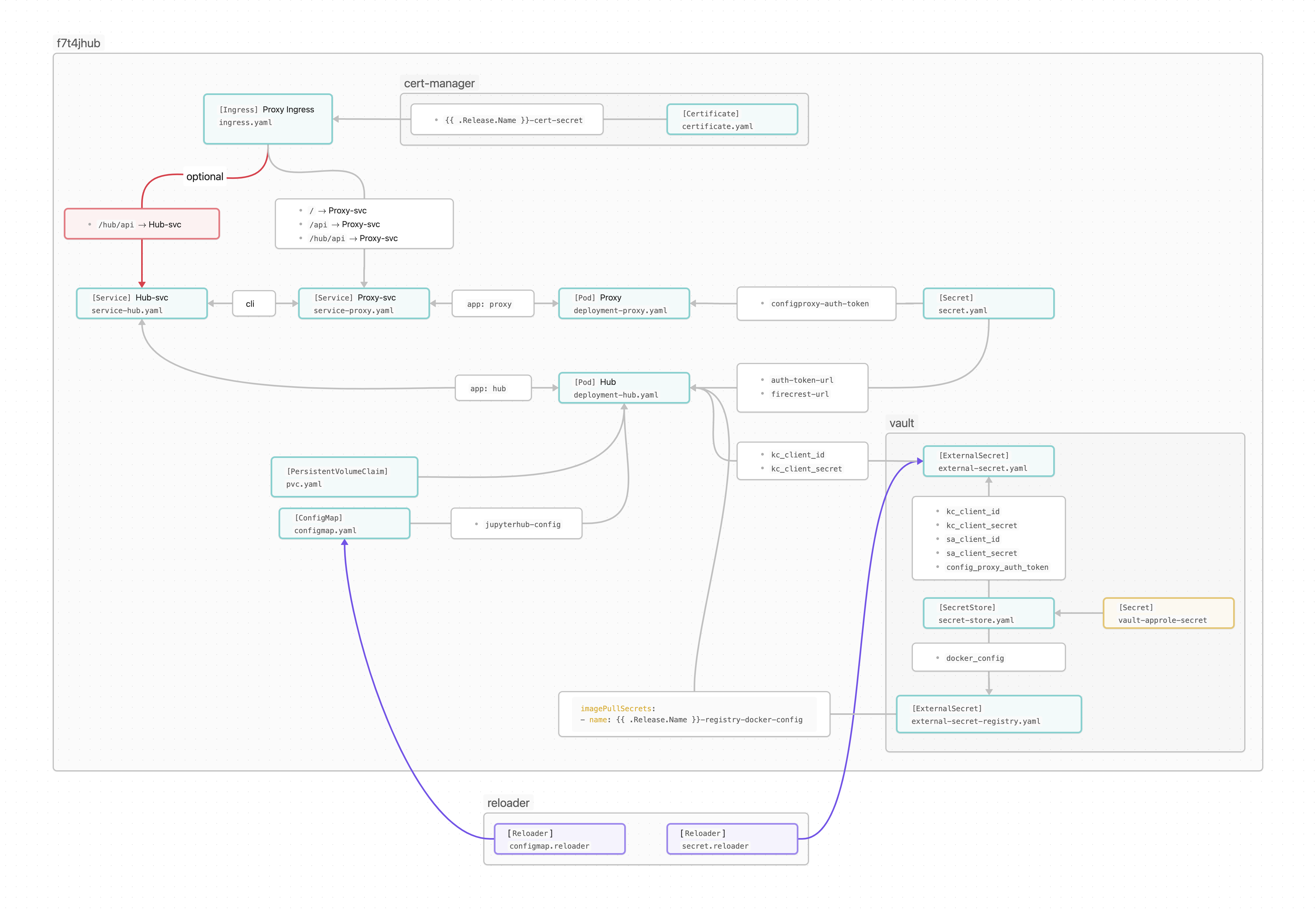
Schematic representation of the f7t4jhub chart
In our deployments at CSCS, the hub and proxy run on their own pods. That’s a standard practice that allows the hub to be restarted (to apply a new configuration, for instance) without affecting users that have running JupyterLab servers. The deployment used the following images:
- Proxy
JupyterHub’s default configurable-http-proxy is used as a proxy. We package it in the container image ghcr.io/eth-cscs/chp. Initially we used
quay.io/jupyterhub/configurable-http-proxy:4.6.1, but because of security reasons, we now build our own image that uses the newernode:lts-alpine3.19as base.- Hub
For the hub, we use our container image
ghcr.io/eth-cscs/f7t4jhub, which includes JupyterHub and FirecRESTSpawner. The corresponding Dockerfile can be found here.
The following figure shows a schematic representation of the deployment:

JupyterHub deployment at CSCS
Access to Keycloak
At CSCS, the Keycloak client’s IDs and secrets to login in JupyterHub are stored in Vault. They can be accessed in our kubernetes deployment via a set of secrets:
The
vault-approle-secretkubernetesSecret, which contains the credentials to access Vault. This secret is not part of the helm chart. It must be created manually for the namespace where the chart will be deployed.A SecretStore, which interacts with the
vault-approle-secretsecret.An ExternalSecret which interacts with the
SecretStoreallowing the deployment to access the client’s IDs and secrets.An optional ExternalSecret to access credentials for a custom container registry. That’s currently not in use.
The section of the chart related to Vault is optional and can be disabled in the values.yaml.
JupyterHub configuration
Another key element of the chart is the ConfigMap mentioned above, which provides
the JupyterHub configuration.
While the configuration includes many parameters, only a handful need to be modified from one deployment to another.
Therefore, templating only those parameters has proven to be sufficient to create a generic chart for all CSCS deployments,
requiring only minor adjustments in the values.yaml.
In our deployments, the required changes are typically related to the authentication settings and the script used by the spawner to submit the Jupyter notebook servers.
All JupyterHub configuration parameters are set under config in the values.yaml.
Live updates
The chart uses Reloader to ensure that the hub pod is restarted if the configuration is modified or if secrets are changed in vault. Since the hub and the proxy run on different pods, plus the JupyterHub database is stored on a persistent volume, it’s possible to apply new configurations without affecting users that have JupyterLab running.
HTTPS Provisioning
HTTPS is automatically provided by cert-manager, which handles the management of of SSL/TLS certificates to ensure secure connections.
Deploying the chart
This section explains how the chart is deployed with Helm or ArgoCD.
For either option, there’s a common first first step, which is the creation of the vault-approle-secret.
That can be done in a namespace with the following command:
kubectl create namespace <namespace>
kubectl create secret generic vault-approle-secret --from-literal secret-id=<approle-secret-id> -n<namespace>
Here secret-id=<approle-secret-id> is a “key, value” pair.
The actual value of <approle-secret-id> can be copied from an existing vault-approle-secret
kubectl get secret vault-approle-secret -n<existing-namespace> -o yaml
# apiVersion: v1
# data:
#   secret-id: <approle-secret-id-base64>
# kind: Secret
# metadata:
#   creationTimestamp: "2024-03-06T16:22:23Z"
#   name: vault-approle-secret
#   namespace: jhub-clariden-tds
#   resourceVersion: "206319585"
#   uid: 29490228-a546-4609-bba3-102dc9b113b9
# type: Opaque
In the output, <approle-secret-id-base64> is the <approle-secret-id> encoded as Base64.
It must be decoded in order to use it with the kubectl create secret command.
All put together
kubectl get secret vault-approle-secret -n<existing-namespace> -o jsonpath="{.data.secret-id}" | base64 --decode
Helm
The repository can be added to the local helm repo with
helm repo add f7t4jhub https://eth-cscs.github.io/firecrestspawner
helm repo update
Now, for instance, the available versions can be listed
helm search repo f7t4jhub/f7t4jhub --versions
# NAME              CHART VERSION   APP VERSION     DESCRIPTION
# f7t4jhub/f7t4jhub 0.6.0           4.1.5           A Helm chart to Deploy JupyterHub with the Fire...
# f7t4jhub/f7t4jhub 0.5.2           4.1.5           A Helm chart to Deploy JupyterHub with the Fire...
# f7t4jhub/f7t4jhub 0.5.1           4.1.5           A Helm chart to Deploy JupyterHub with the Fire...
# f7t4jhub/f7t4jhub 0.5.0           4.1.5           A Helm chart to Deploy JupyterHub with the Fire...
# f7t4jhub/f7t4jhub 0.3.0           4.1.5           A Helm chart to Deploy JupyterHub with the Fire...
Once it’s available locally, the chart can be installed with
helm dependency build
helm install <release> -n<namespace> f7t4jhub/f7t4jhub --values values.yaml --version <chart-version>
and updated live with
helm dependency build
helm upgrade <release> -n<namespace> f7t4jhub/f7t4jhub --values values.yaml
Typically we have used the same name for the namespace and the helm release.
ArgoCD
The values.yaml, as presented in the spawner’s repository, is written for a deployment with Helm.
To deploy the chart with ArgoCD, because of the way we defined the dependencies, both the reloader and the f7t4jhub sections must be indented into another section of the same name.
The structure should look like the following code block, where we have highlighted the two new sections:
reloader:
 reloader:
   reloader:
     # Set to true to enable the reloader for automatically restarting...
     enabled: true
     ...

f7t4jhub:
  f7t4jhub:
    setup:
      # URL for the Firecrest service (replace with your own Firecrest URL)
      firecrestUrl: "https://firecrest.cscs.ch"
      ...
The dependecies are defined like in the following Chart.yaml for the version 0.8.6 of the chart
apiVersion: v2
name: f7t4jhub
description: A Helm chart to Deploy JupyterHub with the FirecREST Spawner
type: application
version: 0.8.6  # same as the chart version
appVersion: "4.1.5"
dependencies:
  - name: f7t4jhub
    version: 0.8.6  # chart version
    repository: https://eth-cscs.github.io/firecrestspawner
  - name: reloader
    version: v1.0.51
    repository: https://stakater.github.io/stakater-charts
    condition: reloader.reloader.enabled
For more information about the ArgoCD deployment, please get in contact with us.
Software installation in the cluster
A JupyterLab installation including the spawner must be available in the HPC cluster.
From the spawner, only the firecrestspawner-singleuser script is used since it’s needed to launch the JupyterLab server.
The necessary software can be installed with
pip install --no-cache jupyterhub==4.1.5 pyfirecrest==2.1.0 SQLAlchemy==1.4.52 oauthenticator==16.0.7 jupyterlab==4.1.8

git clone https://github.com/eth-cscs/firecrestspawner.git
cd firecrestspawner
pip install .
That software can be installed on a python virtual environment, container images or uenv images.
Container images
As an example, this is a dockerfile to install JupyterLab and the spawner within a PyTorch image from NVidia GPU Cloud.
FROM nvcr.io/nvidia/pytorch:24.07-py3

RUN pip install --no-cache \
                jupyterlab \
                jupyterhub==4.1.6 \
                pyfirecrest==2.1.0 \
                SQLAlchemy==1.4.52 \
                oauthenticator==16.3.1 \
                notebook==7.2.1

RUN git clone https://github.com/eth-cscs/firecrestspawner.git && \
    cd firecrestspawner && \
    pip install .
Uenvs
JupyterLab is deployed using either uenvs or containers.
The uenv-based setup uses one uenv for JupyterLab itself, mounted on /user-tools and another uenv that provides the programming environment which is mounted on /user-environments.
In the current implementation, the default environment is PrgEnv-gnu, but the JupyterHub UI allows users to specify a custom uenv.
VS Code
Our JupyterHub deployment includes an integrated VS Code experience directly within JupyterLab.
This is provided through code-server, exposed via jupyter-server-proxy and the jupyter_vscode_proxy extension.
Users can launch a browser-based VS Code environment alongside notebooks and terminals without leaving JupyterLab, enabling a more familiar IDE workflow for software development, debugging, and editing larger codebases
UI and the spawner’s options form
To better integrate JupyterHub with other platforms and services at CSCS, the user interface has been customized using Tailwind CSS and Alpine.js. This approach provides a modern, lightweight, and responsive frontend while allowing consistent styling and interaction patterns across the broader CSCS ecosystem.
The custom Tailwind CSS templates can be found here. Since the spawner’s options form is not part of the static JupyterHub templates, at build time, all Tailwind CSS class names may not be detected. As a result, some styles can be missing from the final CSS bundle. To avoid this, the form markup should be included directly in the HTML templates so that Tailwind can discover the relevant classes during compilation. While this is somewhat inconvenient for highly dynamic forms, in practice the dynamically generated portion typically reuses existing UI elements and styling patterns. Therefore, copying the “static” part of the form into the templates is usually sufficient to ensure that all required Tailwind classes are included in the generated stylesheet.
Dynamic options form
To provide dynamic values in the spawner options form, such as the list of accounts available to a user, we define a Python function that retrieves the required information at runtime and generates the corresponding HTML form. This allows the available options to adapt dynamically based on the authenticated user or external services. The function receives the Spawner instance as an argument, which provides access to deployment-specific helpers and authentication context. In our setup, this is used to access the FirecREST client directly from the spawner.
As an example, the following function uses PyFirecREST’s userinfo to create a menu from which users can select their available accounts
async def dynamic_options_form(spawner):
   """Generate a dynamic spawn form using FirecREST user groups."""

   html_form = """
   <label for="account">Select account:</label>
   <select name="account">
      {options}
   </select>
   """

   client = await spawner.get_firecrest_client()

   # Retrieve user information from FirecREST
   info = await client.userinfo("cluster1")

   # Extract available groups/accounts
   groups = info.get("groups", [])

   # Build HTML options
   options = "\n".join(
      f'<option value="{group["name"]}">{group["name"]}</option>'
      for group in groups
   )

   return html_form.format(options=options)
The function is then registered in the JupyterHub configuration
c.Spawner.options_form = dynamic_options_form
This approach makes it possible to integrate site-specific logic directly into the spawning workflow while keeping the form generation flexible and extensible.